
Top 5 Reverse DNS Lookup Tools for Fast IP-to-Hostname Resolution (2026)
A reverse DNS lookup resolves an IP address back to its hostname, the opposite of a normal DNS lookup, which turns a domain name into an IP. This is done using a PTR record, and it's commonly used to check mail server configurations, investigate entries in a server log, or identify who owns an IP that's showing up somewhere unexpected.
Not every IP has a PTR record. Home internet connections and many mobile IPs often don't have one set, while servers, especially mail servers, usually do. Below are five tools that make checking this simple, including options built for bulk lookups.
1. Locapeak Reverse DNS Lookup — Editor's Choice (Best Web-Based Tool)
Locapeak's Reverse DNS Lookup tool resolves up to 32 IP addresses at once, with support for both IPv4 and IPv6. Paste in a list of IPs, one per line, and it returns the hostname for each along with a clear resolved/unresolved status.
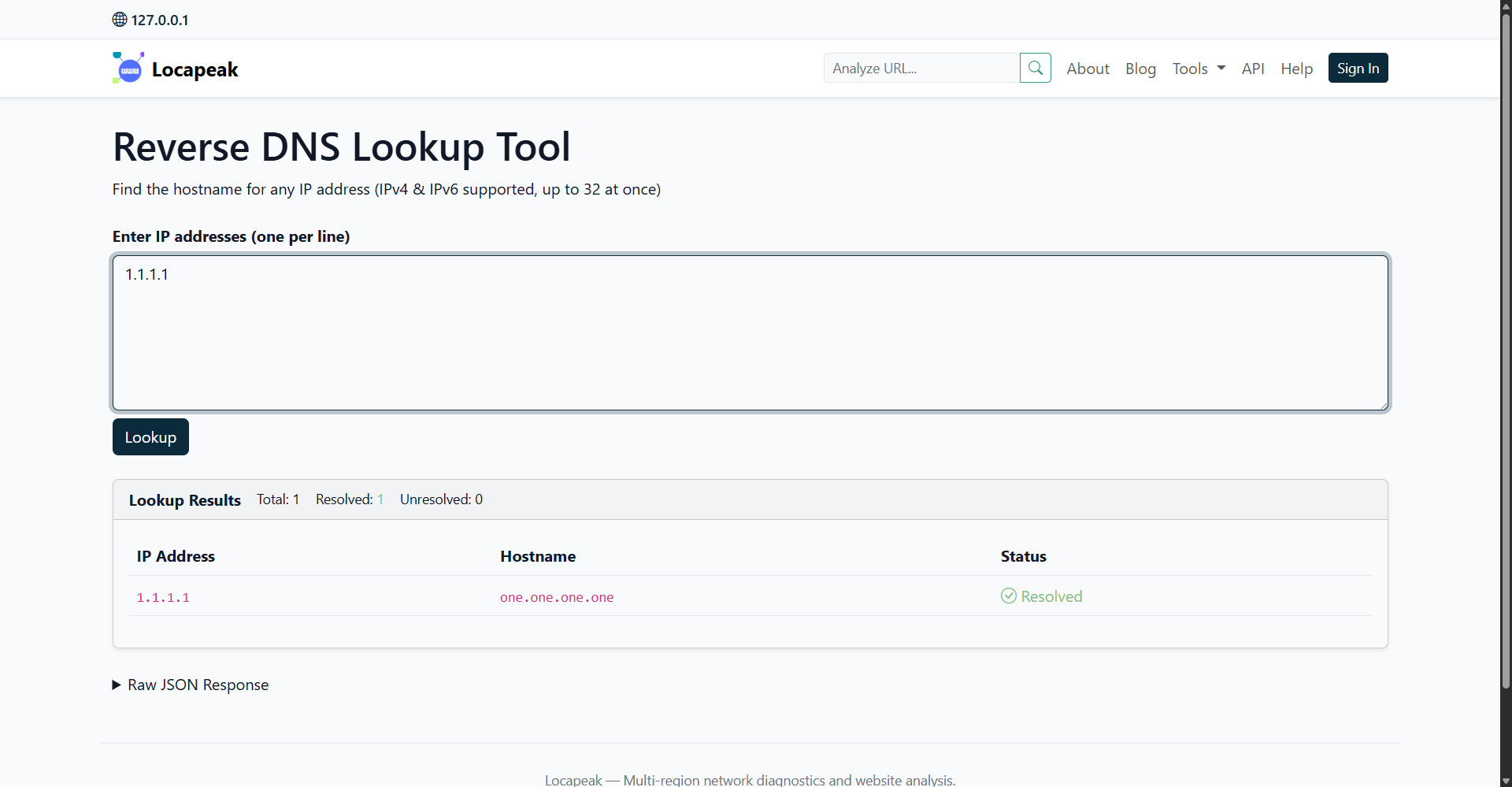
For example, looking up 8.8.8.8 returns dns.google as the resolved hostname. The results are shown in a simple table, with a running total of how many IPs were checked, how many resolved, and how many didn't.
Key features:
-
Bulk lookups of up to 32 IPs per request
-
Full IPv4 and IPv6 support
-
Resolved / unresolved summary counts at a glance
-
Raw JSON response available for anyone who wants to pipe results into a script or another tool
-
No signup required to use it
Why it stands out: most free reverse DNS tools online only handle one IP at a time or cap bulk lookups at 10. Locapeak's 32-IP limit, combined with the JSON output, makes it a better fit for anyone checking a short list of server or mail IPs without needing to run a command-line tool or sign up for an account.
2. HackerTarget Reverse DNS Lookup
HackerTarget's reverse DNS tool goes a step further than a simple IP-to-hostname check. It can resolve a single IP, a range of IPs, or CIDR notation like a /27 subnet, and it can also search for all reverse DNS entries tied to a given organization's domain name.
Free lookups are capped at a /24 subnet (254 addresses), and a paid membership unlocks results up to half a million per query. This makes it more useful for security research and network mapping than for a quick single check, but it's a solid option if you need to sweep an entire subnet at once.
3. DNSChecker.org Reverse DNS Check
DNSChecker's reverse DNS tool is built around simplicity. Enter an IP address, and it queries the PTR record and returns the associated hostname, the same way it would for any public DNS resolver. The tool explains that a PTR record is the DNS record type used to store the hostname tied to an IP address, which makes it a handy option for anyone who's still getting familiar with how reverse DNS works alongside running the check itself.
It's a good pick for quick, single-IP checks, though it doesn't offer the bulk input that a network admin working through a list of IPs would need.
4. IP Tracker Tools — Bulk Reverse DNS
This bulk reverse DNS tool is built specifically for checking multiple IPs in one pass. It allows up to 10 IP addresses per run, supports both IPv4 and IPv6, and returns the PTR hostname for each one, or a "Not set" result when no PTR record exists.
It's aimed at mail admins confirming that sending IPs have properly configured PTR records, and at security teams working through IP lists pulled from logs. The 10-IP limit is lower than some other tools on this list, but it's a straightforward, no-signup option for smaller batches.
5. Online DNS Tools — Bulk Reverse DNS Lookup
Online DNS Tools' bulk reverse DNS lookup is built for larger jobs. It handles up to 500 lookups at once, supports a custom DNS server of your choice, and includes DNSSEC support for verifying the integrity of the results. Results can be exported directly to CSV or JSON.
This makes it a strong choice if you're processing a large list of IPs pulled from server logs or a network audit, though the extra configuration options mean it's less of a one-click tool than the others on this list.
Which One Should You Use?
For most day-to-day checks, a web-based tool that supports IPv4/IPv6 and a reasonable batch size will cover it, without needing to install anything or run a script. Locapeak's Reverse DNS Lookup tool covers that gap well, handling up to 32 IPs in one go with a clean resolved/unresolved breakdown and a raw JSON option for anyone who wants to automate the check later.
For larger subnets or organization-wide reverse DNS mapping, HackerTarget or Online DNS Tools' bulk option are better suited to the job.